




As we’re sweltering in the heat this week, Health Tech World speaks to the experts for practical tips on taking care of your tech…
Technology is designed to work within a range of temperatures, but extreme heatwaves isn’t usually in that threshold. Whether you’re working from home with the fans on, or lucky enough to be taking selfies on the beach, it’s crucial that you take care of your devices as temperatures soar this week.
We’re not used to baking in 35 degrees (plus) temperatures, and neither are our phones. While it may be tempting to do a little work in the garden, or have a lunchtime news-scroll in the park, you could be doing irreversible damage to your device. But there are ways you can enjoy the weather without putting your tech at risk.
Signs your device is too hot
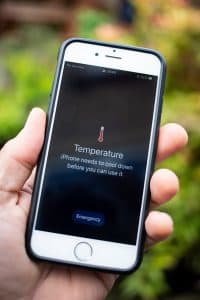
If you’re a member of the Apple club, your iPhone will actually give you a temperature warning as it starts to struggle in the heat. But for the millions of people who have other devices and other phones, you have to look out for other signs.
Apps shutting down without warning
This is one of the main signs your device is struggling in the heat. Apps and programs may freeze up or just decide they’re shutting down completely. Even if you’re indoors – if this starts happening, you might be best finding a cooler spot for you and your device.
Pages taking longer than usual to load
Is your phone dragging its feet and not performing tasks properly? We know how it feels. Watch out for slower-than-usual processes, and, once you’ve established it’s not your internet connection, it might be safe to assume you have exposed it to a bit too much sun.
Mouse and keyboard becoming unresponsive
If your home office is getting uncomfortably hot, you might find your keyboard and mouse trying to tell you so. If they become unresponsive it could be because they’re operating in direct sunlight.
IT specialist Darren Shaw shared his expertise with Health Tech World, and gave some great advice.
He said: “Technology is designed to work within a range of temperatures – and that range can be surprisingly narrow. Tech will have features to keep it within that range – that’s why your phone gets warm when you’re using it heavily as the heat is being dissipated through the case. If the device gets hot – by being left in the sun, or in a hot car – then those temperature control features can actually work in reverse and draw heat into the device.
“When tech goes outside its working temperature range then it can start to malfunction, and it’s not uncommon for it to be irreparably damaged.
He added: “Apart from the really obvious stuff is to just avoid direct sunlight, there are a few other ways you can take care of your tech.
“As an example, we always forget about our routers and we tend not to think about where in the house they are – but a lot of people have them near a window. Check your router and make sure it’s not in direct sunlight, as it might not be the device itself that is suffering in the heat.
“On top of that, I would say to change where you are working from, or where you are sitting more frequently. For a laptop, it might help to give it a new cooler surface every now and then. Give it the cool side of the pillow, so to speak.”
Stop your iPhone from overheating
Tech specialist Barry Poke, CEO of UR added his advice on protecting Apple devices:
He said: “The ideal temperature range for iPhone operation is between 0°C and 35°C, over time, prolonged heat exposure might have an impact on your iPhone’s battery. When it’s too hot, the battery can’t store energy effectively, which causes the phone to slow down. If you let your iPhone get too hot then you will encounter the dreaded temperature warning.
“If you are out and about in this heatwave and notice your iPhone is warming up, then remove your case, unplug any accessories, pop your phone into aeroplane mode and allow it to cool a little before you get back to what you were doing.
After all, there’s nothing worse than not being able to use your phone because it’s overheated, never mind the damage this could cause to your battery. “
“Don’t get caught out by the biggest myth if your iPad overheats in a heatwave. If you are unlucky enough to be on the wrong side of an overheating iPad the one thing you MUST not do is cool it quickly.
Putting it in front of an air conditioning unit or worse still a freezer can cause condensation to form on the inside of the device damaging the internal workings of the tablet.
“What you should do is cool your iPad gradually, turn it off, take off any case and unplug any accessories or charge.”